RP2040 and RP2350 are bare metal microcontrollers, not nearly as easy as ESP32 or teensy
People are excited about the RP2350 (or the older and cheaper RP2040) because it's around 0.50c to $1 cheaper than ESP32-S3, but I found it a more difficult chip to work with, namely lack of support or fragile support for things that "just work" on ESP32 and have worked for 5 to 10 years:
lack of support NVRAM ( #include <Preferences.h> )
more generally ESP32-S3 comes with PSRAM and better manages its 4MB of flash with optionally 2 OTA partitions, one coredump partition, and one small NVRAM partition (both chips have 4MB of flash, but that RP2350 does not have PSRAM)
Lots ESP32 code like OmEspHelpers does not work since it's another chip
lack of crash dump on serial port that can be trivially decoded to find what crashed
fragile serial port support (emulated in software and can disappear at runtime for a variety of reasons)
serial emulated in software, is so slow to setup that arduino missed all your early init Serial output unless you put a delay(1000)
ESP32 will log early setup and init (before your code runs) on serial so you can see early crashes on serial. RP2xxx will not have any serial support working before some time after your code starts, can crash before your code even gets the chance to run its first line, and you will get 0 output on serial to tell you why
the biggest issue is it's apparently "illegal" to compute floating point when initializing a global variable, or to initialize a random value to a global and it totally crashes the chip before you'll see any output on serial. I'm not going to discuss C++ bare metal specs, but I'll point out that Teensy got this working fine and so did ESP32, while RP2xxx doesn't go beyond the spec requirements and happily crashes with 0 output on serial for you to figure things out.
That last point lost me more of a day of work. Not only is the serial support not super reliable and non obvious to setup (see below). I personally will happily pay an extra 50c to $1 per chip to get reliable serial console, early serial debugging, and the super helpful crashdumps on serial with a built in arduino exception decoder that shows me the full backtrace in my source. You save hours of printf debugging with this feature alone, while on RP2xxx, printf debugging might not even work at all.
Took me not hours, but several days to port ESP32 code to it like this library (the library was not too hard, but Table_Mark_Estes was due to globals), because code like Table_Mark_Estes69 and Aurora was full of global initialisations (because why not?) and some did a simple floating point division like ratio = width/height, and that's illegal, or rand = random(1,3) and that's illegal too. Gemini AI also told me that initializing a FastLED object that is copied from another one at global scope is apparently not 'safe' either.
:
So what happens if you do this (which in this case was just compiling code that has worked for 10 years on every single chip I ever compiled it on)? The chip just crashes before setup() ever runs and you ever see any output of any kind
Good luck debugging that without a specialized debugging probe or many trial and error builds until one finally runs long enough for setup to print something.
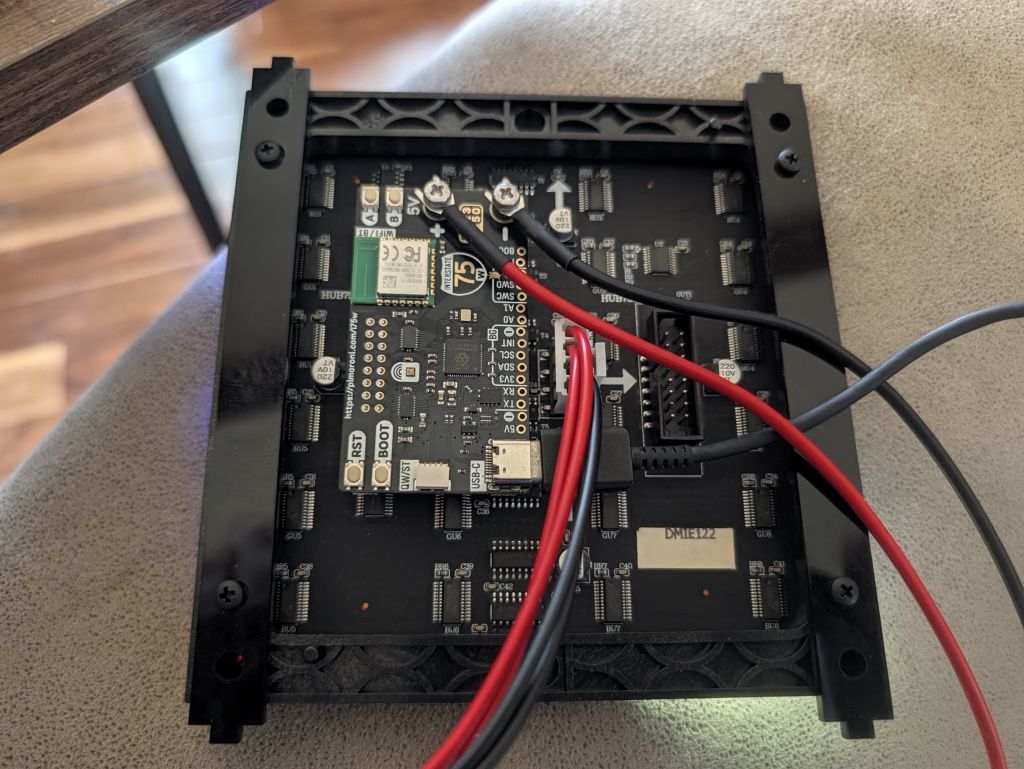
You can get Interstate 75W here: https://shop.pimoroni.com/en-us/products/interstate-75-w . One thing I liked about that board is that the HUB75 connector was layed out so that you can plug the board in most RGBPanels while the Adafruit ESP32S3 MatrixPortal does not directly plug in most panels, or sticks out in an awkward way
It was way too much work chasing all those globals doing float or random, but after a lot of trial and error, success:
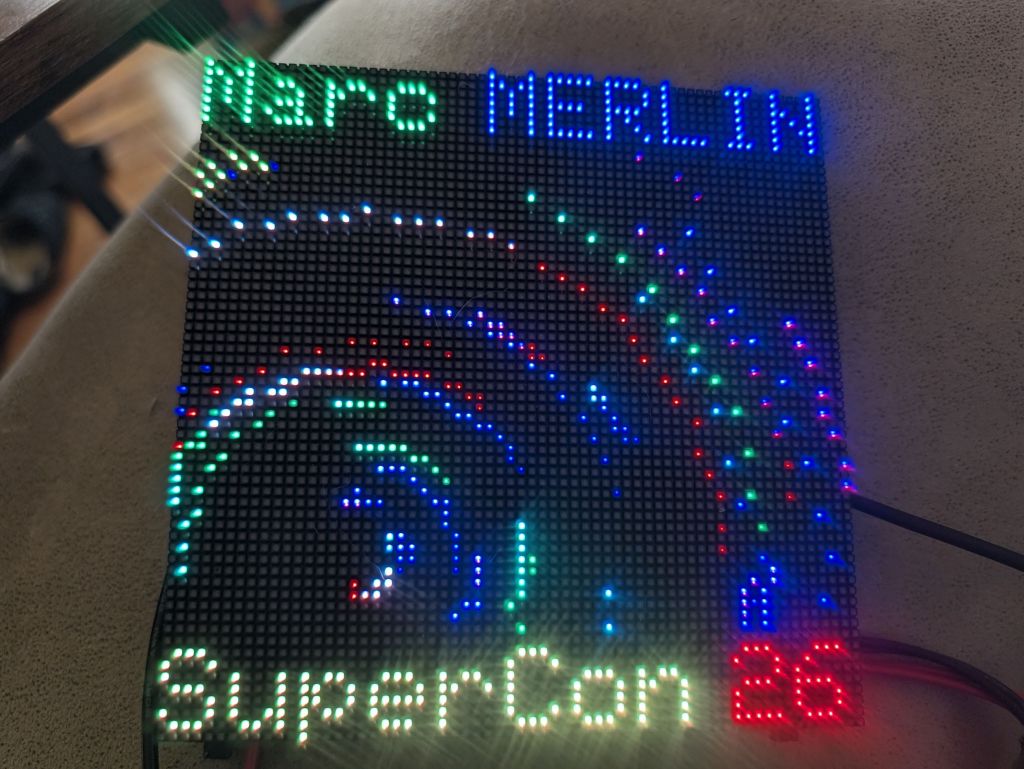
I'll stress again, though, that it took me 2 extra days to get to work compared to an ESP32 S3 Matrixportal, and I still doing have my wifi code working since it doesn't support the ESP32 wifi libs.
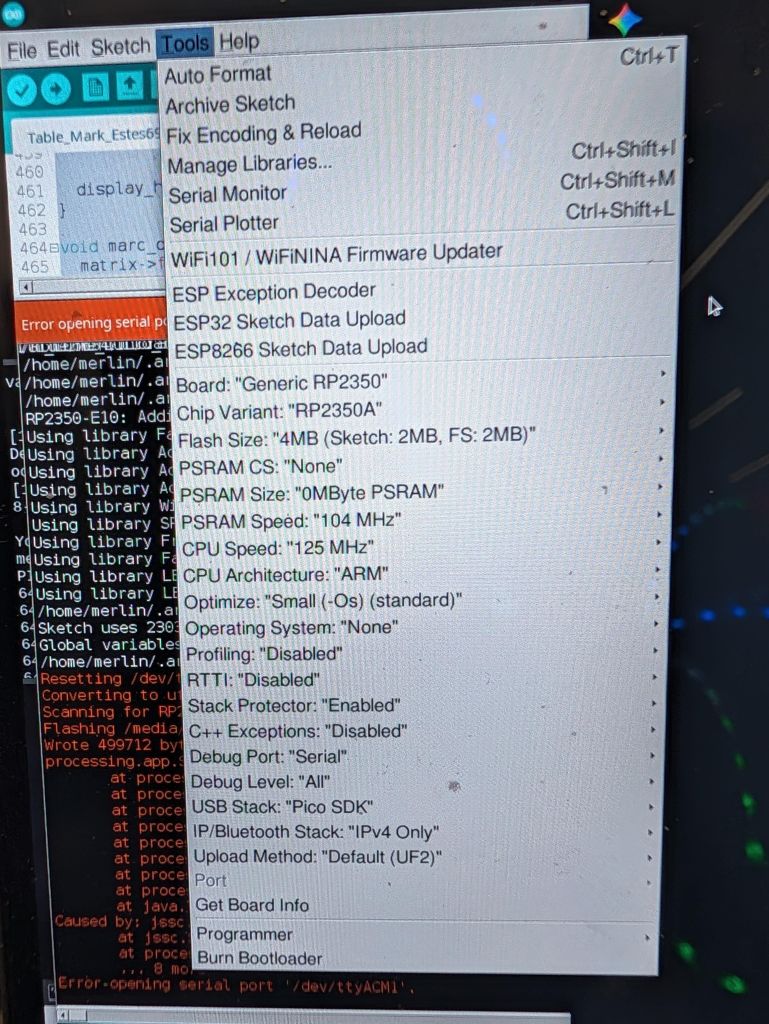
Arduino Environment build options
For ESP32-S3 they are not super obvious and matter. For Interstate 75W, even more so as there is no pre-made chip definition in arduino and if you guess wrong, it will crash:
Board: generic RP2350
Flash Size: 4MB (Sketch: 2MB, FS: 2MB, or 4MB/0 is fine too)
PSRAM: none
CPU Speed: Start with 128Mhz as 150Mhz is too fast for the unpatched Adafruit Lib
Optimize: -Os is fine
Stack Protector: enabled
Debug Port: Serial
Debug Level: All (although that shows plenty of things for ESP32, and it seemed to show none for this chip)
USB Stack: Pico SDK (Adafruit TinyUSB worked for output but failed to receive the reboot command necessary for flashing)
Upload Method: Default/UF2 if it works (worked for me) or picotool if you make it suid root (see below)
Safe Arduino Serial with RP2xxx
Normally you can have a while (!Serial) loop to wait until the serial port comes up, but RP2350 (and RP2040 I'm sure), it does report true while the serial port hasn't appeared on linux yet, so everything sent to serial during setup is lost. You have to add another blind delay after that to account for it.
// 1. Initialize serial port
// Note that the serial port is likely starved by Protomatter, so most serial
// is lost. TODO: move Protomatter to setup1() and loop1()
Serial.begin(115200);

// 2. Allow up to 4 seconds for Linux host CDC-ACM enumeration
uint32_t t0 = millis();
while (!Serial && (millis() - t0 < 4000)) {
  delay(500);
  Serial.println("Priming Serial (especially for RP2xxx chips)");
  Serial.flush();
}

// this is dirty but needed. On RP2350, Serial returns ok, but the end to
// end connection isn't working and the boot messages are lost without this
delay(1000);

Serial.println("\n\n===========================================");
Serial.println("     HARDWARE BOOT OK: Entering setup()");
Serial.println("===========================================");
Serial.flush();
```
Default/UF2 vs picotool
-----------------------
Gemini says, default/UF2 is fragile, it relies on:
sending a serial command that your code may miss, especially if it's crashed (in that case you must hold boot button, push reset, release boot to force going into usb storage mode)
the usb drive being mounted as drive letter
copying the firmware on the drive letter, umounting and that causes a flash/reboot
It can also fail like this if the reset command is lost/ignored by the code (this is one of the big pitfall of that chip, other chips use a line like DTR and have hardware put the chip in flashing mode, even if your code is crashed)
Resetting /dev/ttyACM0
Converting to uf2, output size: 546304, start address: 0x2000
Scanning for RP2040 devices
No drive to deploy.
An error occurred while uploading the sketch
So, if you get the above, force the switch to usb-storage:
hold boot button
push reset button
release hold button
and you get:
[74736.918907] sd 0:0:0:0: Attached scsi generic sg0 type 0
[74736.961850]  sda: sda1
[74736.961948] sd 0:0:0:0: [sda] Attached SCSI removable disk
Then flashing will work
How about flashing with picotool?
picotool is supposedly a more robust flasher than the UF2 method, but it won't work any better than UF2 if the chip isn't being rebooted in usb-storage mode. It won't work out of the box unless you are root, but you can do this:
sauron:~$ sudo chown root:root ~/.arduino15/packages/arduino/tools/rp2040tools/1.0.6/picotool
sauron:~$ sudo chmod 4755 ~/.arduino15/packages/arduino/tools/rp2040tools/1.0.6/picotool
Picotool will then flash:
Sketch uses 250816 bytes (12%) of program storage space. Maximum is 2088960 bytes.
Global variables use 41008 bytes (7%) of dynamic memory, leaving 483280 bytes for local variables. Maximum is 524288 bytes.
/home/merlin/.arduino15/packages/rp2040/tools/pqt-picotool/5.0.0-9576866/picotool load /tmp/arduino_build_830579/Table_Mark_Estes69.ino.uf2 -f -x
Family ID 'rp2350-arm-s' can be downloaded in absolute space:
  00000000->02000000
Annoying, it reboots with errors and failure on serial port, but serial port seems to work in the end:
The device was rebooted to start the application.
processing.app.SerialException: Error opening serial port '/dev/ttyACM0'. Try consulting the documentation at http://playground.arduino.cc/Linux/All#Permission
	at processing.app.Serial.<init>(Serial.java:150)
	at processing.app.Serial.<init>(Serial.java:82)
	at processing.app.SerialMonitor$2.<init>(SerialMonitor.java:132)
	at processing.app.SerialMonitor.open(SerialMonitor.java:132)
	at processing.app.AbstractMonitor.resume(AbstractMonitor.java:132)
	at processing.app.Editor.resumeOrCloseSerialMonitor(Editor.java:2126)
	at processing.app.Editor.access$1300(Editor.java:116)
	at processing.app.Editor$UploadHandler.run(Editor.java:2095)
	at java.lang.Thread.run(Thread.java:748)
Error opening serial port '/dev/ttyACM0'. Try consulting the documentation at http://playground.arduino.cc/Linux/All#Permission
These are the race conditions in the fragile software serial this chip relies on.
USB Stack: Pico USB vs Adafruit TinyUSB
If you have issues with arduino not being able to force flashing mode, use my 'F' command in TME69 that calls 'rp2040.rebootToBootloader();' and lets you reflash without holding back buttons.
But yeah, this is sad, this "just worked" on ESP32-S3 and I've wasted multiple hours with it not working on this RP2350 chip. In my case, I 'fixed' it by switching back from the Adafruit USB stack to the Pico SDK stack in the arduino build optins. My best guess is that the
adafruit stack loses messages/interrupts when the RGBPanel ISR is running while the TinyUSB stack does not.
Dual Core Setup: setup1() and loop1()
On ESP32, it will automatically run wifi callbacks on the other core and probably take care of other ISRs like serial, without you having to worry about it. On RP2350, if you want to offload the first core, you have to manually move variables and code to another core and make sure to carefully sync between the 2 cores with volatile. It's ultimately the same as what is happening on ESP32, but it's happening there by default whereas here you need to make a second setup1() and loop1() which makes your code less compatible with other CPUs.
Verdict
Long story short, things work *so* much better and were *so* much easier on ESP32. I wasted close to 2 days figuring all of this out, but this README will hopefully save you most of the time I lost.

